

If your KitchenAid Artisan Series 5 Quart Tilt Head Stand Mixer isn’t tilting back as it should, it can hinder your baking experience. This guide walks you through common causes and simple fixes to get your mixer working smoothly again.
Understanding the potential issues and how to address them safely will save you time and prevent unnecessary repairs. Whether the tilt mechanism feels stuck or refuses to move, follow these clear steps to troubleshoot effectively.
Key Takeaways
| Identify common causes | Stuck or jammed tilt mechanism, debris, or misalignment. |
| Safety first | Always unplug the mixer before inspection or repair. |
| Step-by-step fixes | Clear instructions for lubrication, cleaning, and adjustments. |
| When to seek professional help | Persistent issues may require expert repair. |

KitchenAid Artisan Series 5 Quart Tilt Head Stand Mixer with Pouring Shield KSM150PS, Milkshake
Built to take it all on with the durable and built-to-last metal construction, and 59 touchpoints around the...
As an affiliate, we earn on qualifying purchases.
Check for Obstructions and Debris
- Unplug your KitchenAid mixer to ensure safety.
- Carefully tilt the mixer head back to examine the hinge area.
- Look for any visible debris, dried food, or buildup around the hinge and tilt mechanism.
- If you see debris, gently clean the area with a soft cloth or a small brush. Avoid using harsh chemicals that might damage the metal parts.
- After cleaning, try tilting the head back slowly to see if the issue is resolved.
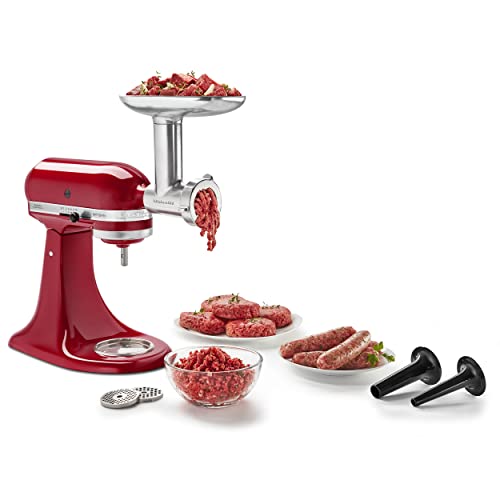
KitchenAid Stand Mixer Attachment, Food Grinder KSMMGA, Metal Food Grinder
Connect to any household KitchenAid Stand Mixer power hub and use the power of the motor to run...
As an affiliate, we earn on qualifying purchases.
Lubricate the Hinge and Moving Parts
- Ensure the mixer is unplugged.
- Apply a small amount of food-grade lubricant or light machine oil to the hinge pin and pivot points.
- Gently move the tilt head back and forth to distribute the lubricant evenly.
- Avoid over-lubricating, which can attract dust and debris.
- Plug in the mixer and test the tilt mechanism for smoother operation.
Inspect the Locking Mechanism
Sometimes, the tilt head won’t lock or unlock properly, preventing it from tilting back. Check if the locking lever or knob is jammed or damaged.
Ensure the lever is fully engaged or disengaged as needed. If it feels loose or stuck, gently adjust or tighten any screws or components that hold it in place.
Adjust or Reset the Tilt Head
- If the tilt head still won’t move, loosen any screws securing the hinge slightly, then realign the head carefully.
- Re-tighten screws securely, but avoid overtightening which can restrict movement.
- Test the tilt function after each adjustment.
When to Seek Professional Repair
If you’ve tried these steps and your mixer still won’t tilt back, it may be a sign of a worn or damaged internal component. Contact an authorized service center or KitchenAid’s customer support for further assistance.
Attempting complex repairs yourself can cause further damage or void warranties, so professional help is recommended for persistent issues.
The Products in This Guide

KitchenAid Artisan Series 5 Quart Tilt Head Stand Mixer
- ✔ Weight: 26 lbs
- ✔ Bowl Capacity: 5 Quarts
- ✔ Color Options: Over 20

KitchenAid Stand Mixer Attachment
- ✔ Attachment Type: Food Grinder
- ✔ Compatible Models: All Household KitchenAid Mixers
- ✔ Includes: Grinding plates and sausage tubes
KitchenAid Artisan Series 5 Quart Tilt Head Stand Mixer
The KitchenAid Artisan Series 5 Quart Tilt Head Stand Mixer is built with sturdy metal construction and offers excellent mixing results with 59 touchpoints around the bowl. Its tilt-head design provides easy access for adding ingredients and cleaning. Though it generally works smoothly, issues with tilting back can occur due to debris or misalignment, which are fixable with simple troubleshooting.
Pros:
- Durable metal construction
- Easy tilt-head access
- Multiple color options
- Powerful 10-speed motor
Cons:
- Can jam if debris accumulates
- Requires careful maintenance
- Slightly heavy for some users
Best for: Bakers who need a reliable, versatile mixer for small or large batches.
Not ideal for: Users seeking a lightweight or compact mixer.
Bottom line: A durable, stylish mixer that performs well with proper maintenance.
KitchenAid Stand Mixer Attachment
The KitchenAid Metal Food Grinder attachment expands your mixer’s capabilities, allowing you to grind meat, vegetables, and more with ease. It connects seamlessly to the power hub and offers multiple grinding plates for various textures, making it a versatile addition to your culinary toolkit.
Pros:
- Easy to attach and use
- Multiple grinding plates included
- Makes fresh ground ingredients
- Sturdy metal build
Cons:
- Requires additional space
- Not suitable for very large quantities
- Cleaning can be time-consuming
Best for: Home cooks who want fresh ground meats and vegetables.
Not ideal for: Those looking for a compact, all-in-one appliance.
Bottom line: A durable attachment that adds significant versatility to your mixer.
Frequently Asked Questions
Why won’t my KitchenAid mixer tilt back?
Common causes include debris buildup, lack of lubrication, misalignment, or a jammed locking mechanism. Follow troubleshooting steps to identify and fix the issue.
Is it safe to lubricate the hinge myself?
Yes, but only use food-grade lubricant or light machine oil. Always unplug the mixer before applying lubricant to prevent injury.
My mixer head is stuck, what should I do?
Check for debris or obstructions. Gently clean around the hinge, apply lubricant if needed, and ensure the locking mechanism isn’t jammed.
Can I repair the tilt mechanism myself?
Basic cleaning and lubrication are safe to do at home. For internal part damage or persistent problems, contact a professional repair service.
How often should I clean the hinge area?
Regularly inspect and clean the hinge area every few months or after heavy use to prevent buildup and ensure smooth operation.
Keep Your KitchenAid Mixer Running Smoothly
Regular maintenance and careful inspection can prevent tilt-back issues and extend the life of your KitchenAid Artisan mixer. Always prioritize safety and consult professional help if problems persist. With proper care, your mixer will continue to serve you well for years of baking and cooking.
Affiliate disclosure: As an Amazon Associate we earn from qualifying purchases. Prices and availability are accurate as of the time of publishing.